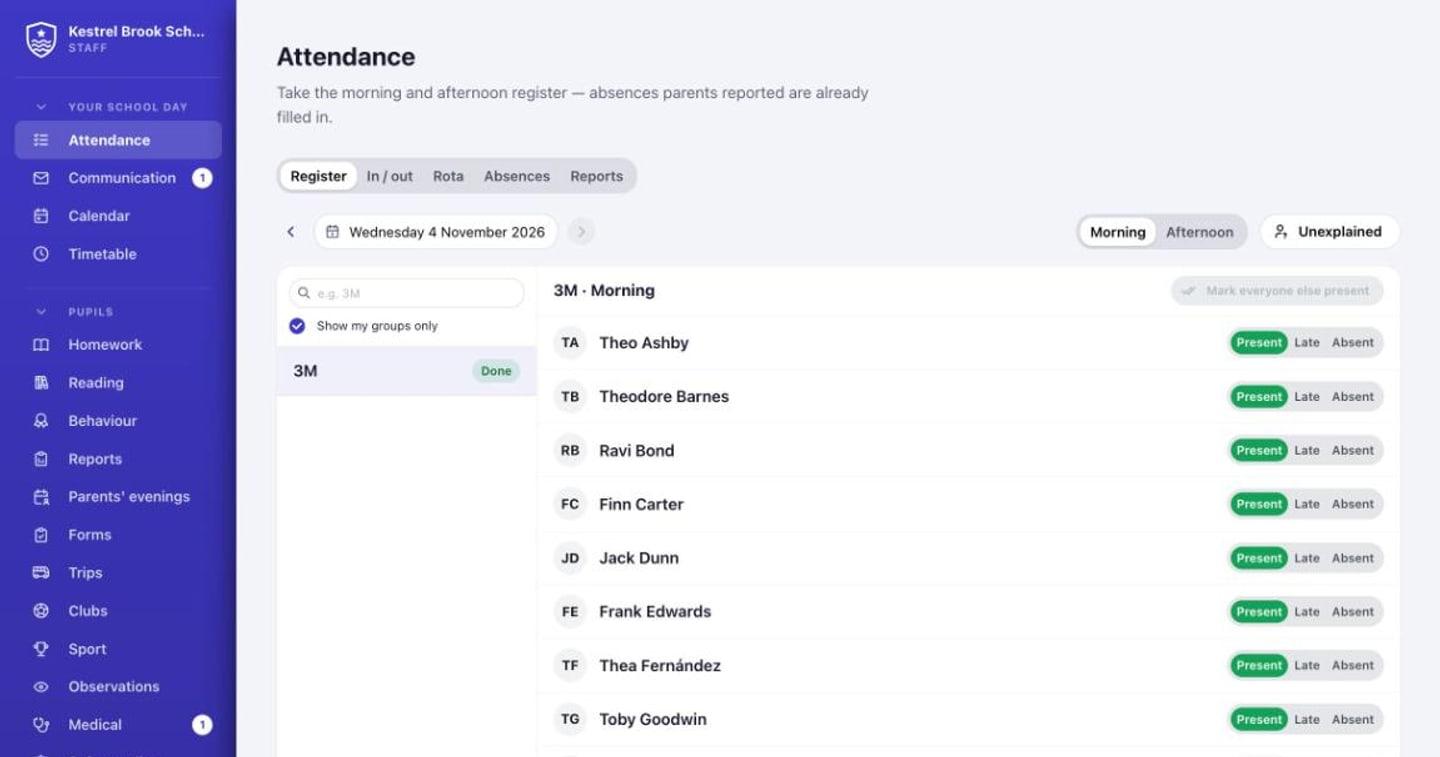
A tap per child
Morning and afternoon registers for every form or class, with lesson registers if you want them. Absences families reported are already in, with their reason.
- AM/PM registers with DfE codes kept for you
- Optional lesson registers, with a flag when a child misses a lesson
- Early years drop-off and collection board
No child unaccounted for
Absent with no reason? After your grace period every guardian gets an alert, and the office sees who still needs a call. A child in at registration but missing from a lesson is flagged to their tutor at once.
- Same-day unexplained absence chase
- Texts for what can't wait
- The fire roll call from today's registers
Attendance you can act on
Attendance by pupil, form and week, with persistent absence flagged, for the people allowed to see it.
- Persistent absence under 90%
- Attendance reports and CSV exports
- School Census attendance worked out
Questions
Do teachers need to know the DfE codes?
No. They tap Present, Late or Absent and pick a reason in plain words. Perch stores the right code underneath.
Does it work for a nursery as well as the school?
Yes. Early years rooms use a drop-off and collection board and a door tablet, while the rest of the school takes morning and afternoon registers.
More of Perch
Be first to try Perch at your school
Perch is getting ready for its first schools. Leave your email and we'll tell you when you can try it, and send the way into our made-up demo school.